https://itinai.com/build-a-local-rag-pipeline-with-ollama-and-deepseek-r1-on-google-colab/
Building a Local Retrieval-Augmented Generation (RAG) Pipeline Using Ollama on Google Colab
This tutorial outlines the steps to create a Retrieval-Augmented Generation (RAG) pipeline utilizing open-source tools on Google Colab. By integrating Ollama, the DeepSeek-R1 1.5B language model, LangChain, and ChromaDB, users can efficiently query real-time information from uploaded PDF documents. This approach offers a private, cost-effective solution for businesses seeking to enhance their data retrieval capabilities.
1. Setting Up the Environment
1.1 Installing Required Libraries
To begin, we need to install essential libraries that will support our RAG pipeline:
- Ollama
- LangChain
- Sentence Transformers
- ChromaDB
- FAISS
These libraries facilitate document processing, embedding, vector storage, and retrieval functionalities necessary for an efficient RAG system.
1.2 Enabling Terminal Access in Google Colab
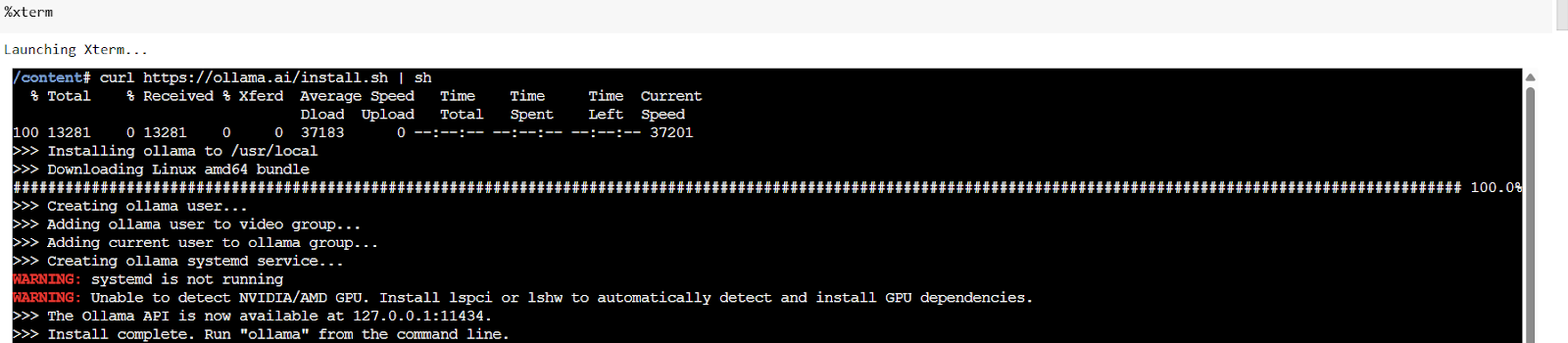
To run commands directly within Colab, we will install the colab-xterm extension. This allows us to execute terminal commands seamlessly:
!pip install colab-xterm
%load_ext colabxterm
%xterm
2. Uploading and Processing PDF Documents
2.1 Uploading PDF Files
Users can upload their PDF documents for processing. The system will verify the file type to ensure it is a PDF:
print("Please upload your PDF file…")
uploaded = files.upload()
file_path = list(uploaded.keys())[0]
if not file_path.endswith('.pdf'):
    print("Warning: Uploaded file is not a PDF. This may cause issues.")
2.2 Extracting Content from PDFs
After uploading, we will extract the content using the pypdf library:
loader = PyPDFLoader(file_path)
documents = loader.load()
print(f"Successfully loaded {len(documents)} pages from PDF")
2.3 Splitting Text for Better Context
The extracted text will be divided into manageable chunks for improved context retention:
text_splitter = RecursiveCharacterTextSplitter(chunk_size=1000, chunk_overlap=200)
chunks = text_splitter.split_documents(documents)
print(f"Split documents into {len(chunks)} chunks")
3. Building the RAG Pipeline
3.1 Creating Embeddings and Vector Store
We will generate embeddings for the text chunks and store them in a ChromaDB vector store for efficient retrieval:
embeddings = HuggingFaceEmbeddings(model_name="all-MiniLM-L6-v2", model_kwargs={'device': 'cpu'})
persist_directory = "./chroma_db"
vectorstore = Chroma.from_documents(documents=chunks, embedding=embeddings, persist_directory=persist_directory)
print(f"Vector store created and persisted to {persist_directory}")
3.2 Integrating the Language Model
The final step involves connecting the DeepSeek-R1 model with the retriever to complete the RAG pipeline:
llm = OllamaLLM(model="deepseek-r1:1.5b")
retriever = vectorstore.as_retriever(search_type="similarity", search_kwargs={"k": 3})
qa_chain = RetrievalQA.from_chain_type(llm=llm, chain_type="stuff", retriever=retriever, return_source_documents=True)
print("RAG pipeline created successfully!")
4. Querying the RAG Pipeline
4.1 Running Queries
To test the pipeline, we can define a function to query the RAG system and retrieve relevant answers:
def query_rag(question):
    result = qa_chain({"query": question})
    print("Question:", question)
    print("Answer:", result["result"])
    print("Sources:")
    for i, doc in enumerate(result["source_documents"]):
        print(f"Source {i+1}:\n{doc.content[:200]}...\n")
    return result

question = "What is the main topic of this document?"
result = query_rag(question)
5. Conclusion
This tutorial demonstrates how to build a lightweight yet powerful RAG system that operates efficiently on Google Colab. By leveraging Ollama, ChromaDB, and LangChain, businesses can create scalable, customizable, and privacy-friendly AI assistants without incurring cloud costs. This architecture not only enhances data retrieval but also empowers users to ask questions based on up-to-date content from their documents.
For further inquiries or guidance on implementing AI solutions in your business, please contact us at hello@itinai.ru. Follow us on Telegram, X, and LinkedIn.

https://itinai.com/build-a-local-rag-pipeline-with-ollama-and-deepseek-r1-on-google-colab/
#RAGPipeline #Ollama #GoogleColab #AI #DataRetrieval

No comments:
Post a Comment